
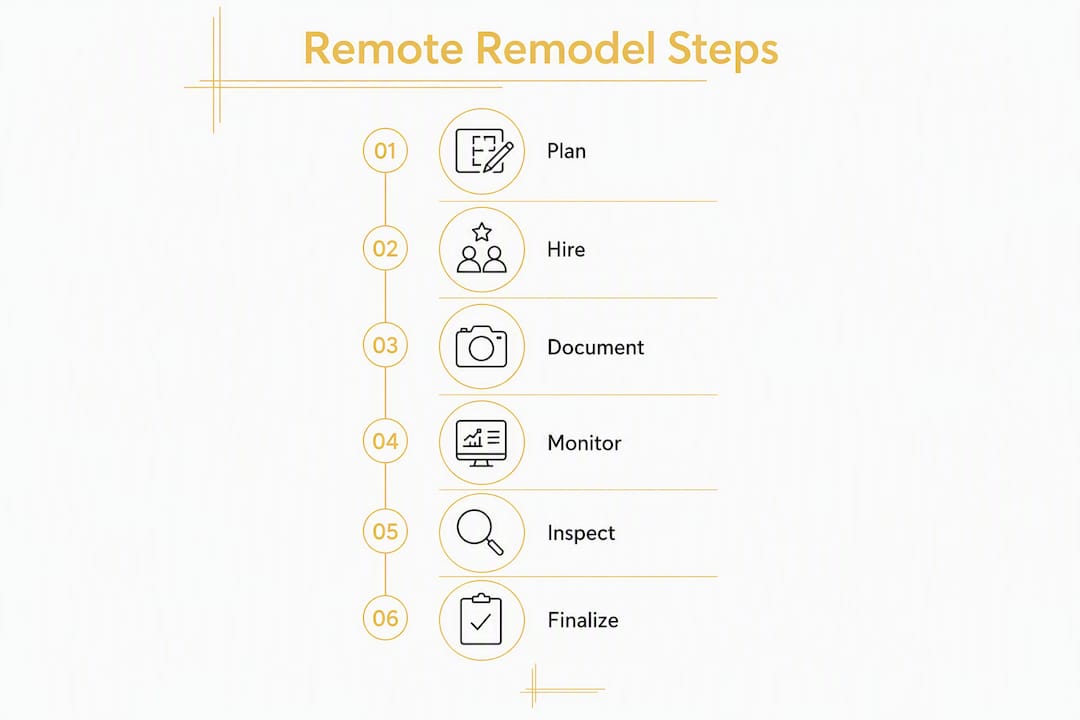
You can successfully manage a kitchen remodel remotely by locking a written scope before demolition starts, hiring a contractor with a proven system for long-distance clients, and using milestone-based payments tied to a project-management platform with daily photos and video walkthroughs. That combination covers the three biggest failure points: unclear decisions, invisible progress, and unprotected payments.
Your quick-start checklist:
The single biggest cause of remote project delays is a decision that wasn’t made before the crew showed up. Cabinets ordered late push countertop templating by weeks. An appliance model that wasn’t confirmed can mean a rough-in that needs to be moved. Getting ahead of these decisions is the foundation of any solid online remodel planning strategy.
Start with a written scope of work that lists every task, material, finish, brand, and model number you can confirm. Where exact selections aren’t final, include a dollar allowance with a selection window so the contractor can keep scheduling. A phase-by-phase kitchen remodel checklist helps you track which decisions belong to which stage.
Decision timeline by phase:
| Phase | Must-decide items | Decision deadline |
|---|---|---|
| Pre-demo | Cabinetry style, sizes, and brand; appliance models and clearances; footprint changes; electrical load upgrades | Before contract signing |
| Rough-in | Plumbing fixture specs; lighting locations; any structural modifications | Before rough-in begins |
| Finish stage | Countertop material, edge profile, and slab selection; backsplash tile; flooring transitions | Before countertop templating |
| Final | Hardware, paint colors, trim details | Before finish installations |
Include a contingency line of 5–20% of your total budget, and specify in writing who approves overages and how change orders are submitted. For remote owners, that process needs to be airtight: a verbal “sure, go ahead” is not a change order.
Pro Tip: Create a short sample-approval form that lists acceptable substitutes and a 72-hour approval window. If you don’t respond within that window, the contractor proceeds with the pre-approved substitute. This prevents a single unanswered email from stalling a crew for three days.
Hiring a contractor with a proven system for long-distance clients is the single most important decision you’ll make for a remote kitchen renovation. Price matters, but a contractor who can’t give you daily visibility into progress is a liability, not a bargain.
One-stop remodelers reduce coordination overhead significantly for remote owners. When a single provider handles materials, scheduling, and installation, you have one phone number, one contract, and one point of accountability. That matters when you’re managing decisions across time zones. Our guide on single-contractor kitchen and bathroom remodels explains exactly why that structure works.
The right technology stack turns a remote kitchen renovation from a guessing game into a managed process. Each tool serves a specific job, and you should confirm your contractor uses all three categories before signing anything.
Buildertrend and CoConstruct are the two most widely cited platforms for contractors working with absentee homeowners. Both give you client-level access to schedules, change orders, budget tracking, and photo logs. If your contractor uses a different system, confirm it has those same client-facing features. The PM platform is not an optional admin tool.

Weekly video calls and standardized-angle photos are the minimum communication standard recommended by experienced contractors for remote projects. Use Zoom or FaceTime for your standing weekly walkthrough and for any urgent decisions. Record every meeting so you have a timestamped decision log. Text and email work for quick confirmations, but video is the only way to catch a framing issue or a cabinet alignment problem before it’s covered by drywall.
Matterport scans and high-quality video walkthroughs are especially useful before countertop templating and before final finish installations. A Matterport scan gives you spatial measurements you can verify remotely, which reduces the risk of rework caused by mis-measurements. For routine progress, require photos from fixed angles with a tape measure visible for scale, timestamped and uploaded to the PM platform.
Pro Tip: Set a single folder structure and filename convention for all project photos from day one. A format like 2026-03-15_kitchen_demo_north-wall.jpg makes it easy to pull any image in seconds. Store everything in the PM platform or a shared Google Drive folder, not in a contractor’s personal phone camera roll.
Poor communication planning and delayed decisions are the most common causes of remote renovation problems, according to RemoteBuilder’s project guides. A milestone framework with clear decision gates solves both issues by giving you and your contractor a shared calendar of what needs to happen and when.
Sample milestone schedule:
| Milestone | Trigger for next phase | Homeowner sign-off required | Decision deadline |
|---|---|---|---|
| Deposit and kickoff | Signed contract and scope | Yes | Before demo |
| Demo complete | Rough-in can begin | Photo log review | Within a few days of photos |
| Rough plumbing/electrical | Cabinet delivery and install | Third-party or contractor sign-off | Within a few days |
| Cabinet install complete | Countertop templating | Video walkthrough approval | Within 24 hours |
| Countertop templating | Countertop fabrication | Yes, written confirmation | Same day as walkthrough |
| Finish installations | Punch list begins | Photo and video review | Within a few days |
| Punch list resolved | Final payment release | Final video walkthrough | Before payment |
Tie payment releases to these sign-offs. If a homeowner misses an approval window, the contract should specify a default outcome (proceed with pre-approved substitute or pause with a schedule-delay notice) rather than leaving the crew idle.
Custom cabinets typically carry lead times of 6–12 weeks, and stone slabs can take 2–4 weeks from selection to delivery. Order these items as early as possible, and build those lead times into the milestone schedule before you set any demo date.

Pro Tip: Schedule a mandatory pre-templating video call with your contractor and cabinet installer to confirm the cabinet layout is exactly as specified before the countertop fabricator takes measurements. A single misaligned cabinet discovered after templating adds weeks and real cost.
A remote kitchen renovation needs a named on-site point of contact before the first crew member shows up. This person is your eyes, your delivery receiver, and your first line of quality control. Without one, small problems compound quickly.
For deliveries, document exactly where materials are stored, who signs for each shipment, and what environmental controls are in place. Stone slabs need to be stored vertically on padded supports. Appliances need to stay in their original packaging in a climate-controlled space until installation day. Our kitchen remodel staging guide covers consolidated staging areas and moisture protection for flooring in more detail.
Access and security deserve a written protocol: document key storage or keypad codes, specify which trades are authorized and during what hours, and change codes between major phases if different subcontractors are cycling through.
In most U.S. jurisdictions, the licensed contractor pulls the permits, not the homeowner. Confirm this is the case in your municipality before signing the contract, and require the contractor to store permit copies in the PM platform as soon as they’re issued.
Inspection log template:
Most municipal permit portals in the U.S. allow you to check permit status online using the permit number. Ask your contractor for that number on day one and bookmark the portal. Require the contractor to attend every inspection and send you a live video or same-day photo report of the result.
For critical milestones like structural work, waterproofing, or any work that will be concealed, consider hiring an independent third-party inspector. Their report goes into the PM platform alongside the contractor’s own documentation. Store all permits, approved inspection reports, and the final certificate of occupancy in the PM platform so you have a complete handover package.
Milestone-based payments tied to verified progress are the standard recommendation for remote homeowners. Avoid releasing large sums upfront. A common structure looks like this:
| Payment | Amount (% of total) | Trigger | Required documentation |
|---|---|---|---|
| Deposit | 10% | Signed contract | Executed contract and scope |
| Demo complete | 15% | Demo photo log approved | Photo log in PM platform |
| Rough-in complete | 20% | Rough-in inspection passed | Inspection report + photos |
| Cabinet install | 20% | Cabinet walkthrough approved | Video walkthrough sign-off |
| Finish installations | — | Finish photo review approved | Photo log + video walkthrough |
| Final payment | 10% | Punch list resolved, lien waivers received | Final lien waivers + warranty docs |
Retainage on the final 10% gives you leverage to get the punch list resolved. Escrow or milestone escrow services add another layer of protection by preventing fund release until milestones are independently verified.
Every change order must be in writing before work proceeds, with the scope change, cost impact, and schedule impact documented in the PM platform. Require a lien waiver from the contractor and all major subcontractors at each payment. Ask for supplier receipts on high-ticket items like custom cabinets and stone countertops so you can verify the materials were actually purchased and paid for.
Remote quality control works when you have a documented standard, not just a general expectation. Require your contractor to submit photos from fixed angles at each milestone, with a tape measure visible for scale and a timestamp. Upload everything to the PM platform, not a group text.
The contractor’s project-management platform is your primary window into the project. Without client access to schedules, change orders, and daily photos, you’re managing on trust alone. That’s a significant risk when you can’t walk the site.
The trust signals that matter most for remote owners are: daily photo logs, a written scope-of-work and change-order process, a timeline with penalties or holdbacks for delays, verified licenses and insurance, a documented payment schedule with lien waivers, and access to third-party inspection options. These aren’t nice extras. They’re the baseline for a contractor worth hiring for a long-distance project.
A one-stop remodeler centralizes ordering, scheduling, and warranty work under a single contract. For a remote owner, that means one call to resolve a warranty issue instead of tracking down three separate subcontractors. It also means faster decisions because the person selecting your cabinets is the same organization installing them.
Pro Tip: During contractor interviews, ask for a live demo of their PM platform and request a sample project export showing budget history, photo log, and change-order records. A contractor who can’t produce that in 10 minutes probably doesn’t use the system consistently enough to rely on.
Remote kitchen remodel management adds coordination time to every phase. Expect 15–30% longer project durations compared to an owner who is on-site daily, primarily because of sample shipping time, decision lag, and added scheduling coordination.
For budget, a common guideline suggests keeping total renovation spending within a reasonable fraction of your home’s value to protect resale return. Build a contingency of 10–20% for most kitchens, and consider 15–30% if structural work or long-lead custom items are involved. For faster renovation options that reduce timeline risk, in-stock cabinet lines and pre-fabricated countertops can shave weeks off the schedule.
The closing phase of a remote kitchen renovation is where details get missed if you don’t have a script. Use this checklist and walkthrough sequence to close the job with confidence.
Closing checklist:
Final walkthrough script for your on-site POC:
Ask them to start at the entry to the kitchen and move systematically: show the full room from each corner, then close-ups of every cabinet door and drawer (open and close each one), countertop seams and edges, backsplash grout lines, under-sink plumbing connections, and all appliance controls. Test the range, dishwasher, refrigerator, and any built-in microwave live on camera. End with the lighting and any new electrical outlets. Record the full walkthrough and upload it to the PM platform before releasing final payment.
Managing a kitchen remodel remotely works when you lock a written scope before demo, require PM platform access from your contractor, and tie every payment to verified milestone documentation.
| Point | Details |
|---|---|
| Lock scope before demo | Sign a written scope with finishes, allowances, and decision deadlines before any demolition begins. |
| Require PM platform access | Demand client access to Buildertrend, CoConstruct, or equivalent for schedules, photos, and change orders. |
| Use milestone payments | Structure payments in phases tied to photo logs, video walkthroughs, and lien waivers at each release. |
| Plan for longer timelines | Remote projects typically run 15–30% longer; build that buffer into your schedule and contingency. |
| The Kitchen, Bathroom & Flooring Store | Offers one-stop kitchen remodeling with in-house design, installation, and project management for remote homeowners in Jacksonville. |
Here’s what most remote-remodel guides won’t tell you directly: the coordination problem is harder than the construction problem. A skilled crew can build a beautiful kitchen. The part that breaks down is the chain of decisions, approvals, deliveries, and handoffs between a homeowner who isn’t there and four or five separate vendors who don’t talk to each other.
That’s why we consistently recommend a one-stop remodeler for remote owners. Not because it’s the only way to do it, but because it eliminates the single biggest failure point: fragmented accountability. When your cabinet supplier, countertop fabricator, and installation crew are all under one contract, a problem with the countertop template doesn’t turn into a three-way blame conversation. One call, one resolution.
What I’ve seen in practice is that remote homeowners who try to coordinate multiple vendors independently spend more time managing the project than they expected, and they’re more likely to miss a decision window that cascades into a schedule delay. A one-stop provider with in-showroom design support and a client-accessible PM platform compresses that coordination into a single relationship. You still need to be engaged and responsive, but you’re not the project manager. You’re the decision-maker.
Managing a kitchen renovation from a distance is genuinely doable, and it’s much less stressful when you have a single team handling design, materials, and installation under one roof.
The Kitchen, Bathroom & Flooring Store provides full-service kitchen remodeling for homeowners in Jacksonville, Saint Johns, and Duval counties, with in-showroom design consultations, a curated selection of cabinets, countertops, and flooring, and professional installation managed by one team. For remote owners, that means guided product selection (in-person or virtually), milestone-based invoicing, and a single point of contact for every phase of the project, from the first design meeting through final punch list. No juggling separate vendors, no chasing down subcontractors for warranty calls.
Special financing options are available to help you plan within your budget, and our team is experienced with homeowners who need to make selections and approvals from a distance. Ready to get started? Schedule a virtual consultation or visit our Jacksonville showroom to talk through your project scope and timeline.
PM platforms to request from your contractor:
Permit resources:
Documentation to collect and store in the PM platform: